
返回文章
ARTICLE
脚摸脚通过 gitlab-ci.yml 实现 流水线自动打包部署
以我自己的 ubuntu22.04 版本为例 总共四步, * setup: 设置;提前进行一些操作,比如提前安装包,我这里没有必要就没有写,但是保留了这个步骤 * install: 安装项目包 * build: 打包项目 * deploy: 部署项目 把这个文件复制到容器内作为 nginx 配置文件,写入以下内容 runner 会根据这个文件创建一
基于 Docker(gitlab, gitlab-runner) 搭建完整的自动化 CI,CD 流程(Linux)(三)
脚摸脚通过 gitlab-ci.yml 实现 流水线自动打包部署
以我自己的 ubuntu22.04 版本为例
在项目根目录下创建一个 .gitlab-ci.yml 文件
总共四步,
- setup: 设置;提前进行一些操作,比如提前安装包,我这里没有必要就没有写,但是保留了这个步骤
- install: 安装项目包
- build: 打包项目
- deploy: 部署项目
image: node:16.15.0

# 公共模板定义
.template: &templateDef
    only:
        - master
        - release
        - test
    cache:
        key: ${CI_COMMIT_REF_SLUG}
        paths:
            - node_modules/
            - dist

# 定义 CI/CD 的阶段
stages:
    - setup
    - install
    - build
    - deploy

# 'setup' 阶段:安装 pnpm 和 http-server
setup:
    <<: *templateDef
    stage: setup
    script:
        - npm config set registry https://registry.npm.taobao.org

# 'install' 阶段
job_install:
    <<: *templateDef
    stage: install
    script:
        - npm config set registry https://registry.npm.taobao.org
        - npm install

# 'build' 阶段
job_build:
    <<: *templateDef
    stage: build
    script:
        - npm config set registry https://registry.npm.taobao.org
        - npm run build
    artifacts:
        paths:
            - dist/

# 'deploy' 阶段,为了启动
job_deploy:
    image: docker:19.03.12
    <<: *templateDef
    services:
        - docker:19.03.12-dind
    stage: deploy
    script:
        - docker build -t appimages .
        - echo "Existing containers:"
        - docker ps -a
        - if [ $(docker ps -aq --filter name=app-container) ]; then
          echo "Removing existing container...";
          docker rm -f app-container;
          else
          echo "No existing container found.";
          fi
        - echo "Running new container..."
        - docker run -d -p 8080:80 --name app-container appimages

    dependencies:
        - job_build
在项目根目录下创建 nginx.conf 文件
把这个文件复制到容器内作为 nginx 配置文件,写入以下内容
server {
  #端口
  listen 80;
  server_name localhost;

  #charset koi8-r;
  access_log /var/log/nginx/host.access.log main;
  error_log /var/log/nginx/error.log error;

  #配置 vue 路由 history模式
  location / {
    root /usr/share/nginx/html;
    try_files $uri $uri/ /index.html;
  }

  #error_page 404 /404.html;
  # redirect server error pages to the static page /50x.html
  #
  error_page 500 502 503 504 /50x.html;
  location = /50x.html {
    root /usr/share/nginx/html;
  }
}
在项目根目录下创建 Dockerfile 文件
runner 会根据这个文件创建一个 docker 镜像,文件写入内容如下
FROM nginx
COPY dist/ /usr/share/nginx/html/
COPY nginx.conf /etc/nginx/conf.d/default.conf
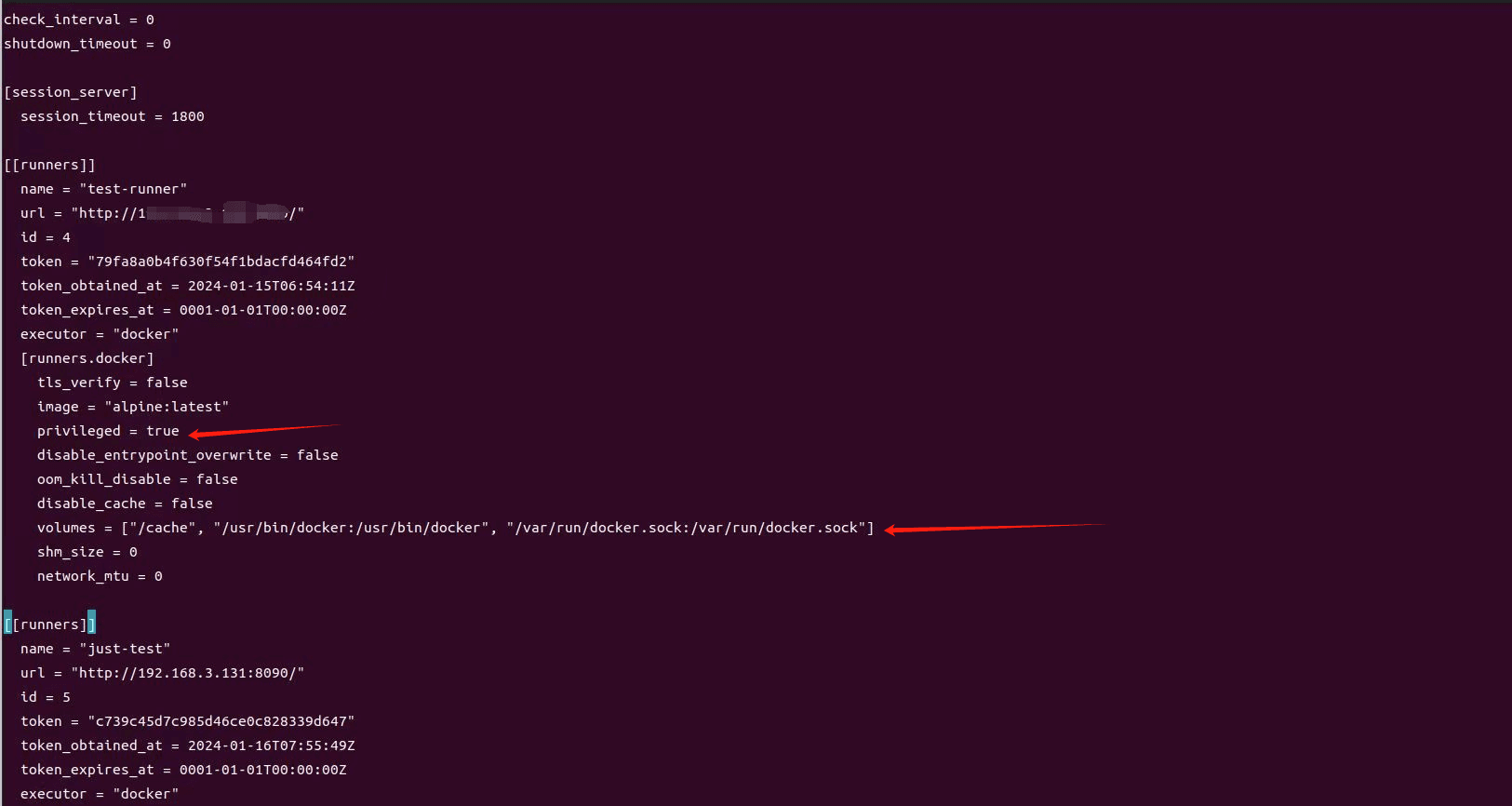
然后上传文件到 gitlab,会自动促发流水线流程,如果出现链接问题,进入 gitlab-runner 容器按照下图修改一下配置
# 进入 gitlab-runner 容器
docker exec -it gitlab-runner /bin/bash
# 修改 runner 的配置项目
vim /etc/gitlab-runner/config.toml
PS:这里你之前使用的是那个runner就修改那个runner,我的图片中有2个 runner 是因为我为了添加截图重新注册了一个 runner
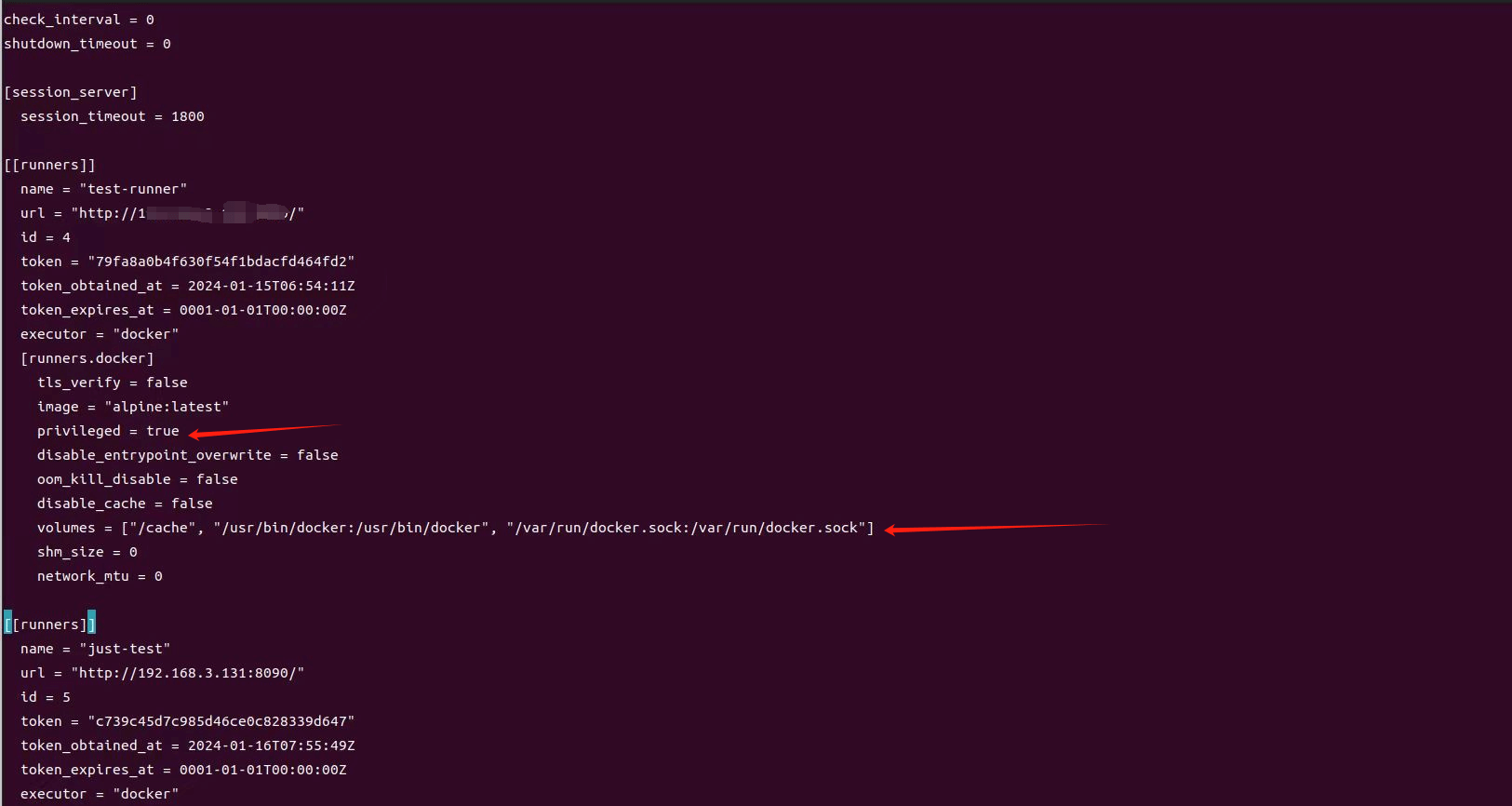
图片1:config.toml 配置
访问部署好的项目
输入网址 ${url}:8080 就可以访问你刚才部署的项目,8080 是 gitlab-ci.yml 中的 depoly 步骤配置的端口映射
gitlab-ci.yml 参数配置说明
script 被 runner 执行的 shell script
after_script 在 job 之后执行的脚本
allow_failure 是否允许 job 失败
artifacts 在 job 成功后将一个文件列表或目录列表制成制品上传
before_script 在 job 之前执行的脚本
cache 缓存在随后的 job 的一些文件、目录
coverage 代码覆盖率设置
dependencies 依赖某个 job 的制品并下载到当前的 job 中
environment job 依赖的环境变量
except 限制那些情况 job 不会被触发
extends job 的继承的配置项
image 依赖的 Docker 镜像
include 运行 job 包含额外的 yml 文件
interruptible 定义当作业因较新的运行而变得冗余时是否可以取消。
only 限制 job 何时可以被触发
pages 上传 job 的结果到 GitLab Pages
parallel 一个 job 应该并行运行多少个实例。
release 通知 runner 生成一个 release
resource_group 限制 job 的并发性
retry 是否重试 重试几次
rules 与 only/except 类似,限制 job 的调起
services 使用 Docker 镜像服务
stage 阶段
tags 选择 runner 的 tag
timeout 超时
trigger 定义下游 pipelines 触发器
variables 定义 job 级别的变量
when 何时触发任务